Clastra: The Robotic Font for Modern Projects
Design is rarely just about making things look pretty; it is about communication, tone, and immediate recognition. When you are working on a project that demands a specific attitude—something futuristic, industrial, or strictly technological—the right typeface can do the heavy lifting for you. This is where Clastra enters the conversation. It is not merely another sans-serif font found in standard software suites. It is a distinct, robotic-styled typeface designed to inject a sense of precision and cybernetic cool into your visual identity.
If you have ever struggled to find a font that feels both modern and mechanical without looking like a generic sci-fi movie prop, Clastra offers a compelling solution. Its design language speaks directly to the digital age, blending clean lines with intricate details that suggest machinery, code, and advanced technology. Whether you are a seasoned graphic designer, a small business owner launching a tech startup, or a hobbyist creating content for social media, understanding how to leverage a specialized font like this can elevate your work from ordinary to unforgettable.
What Makes Clastra Different?
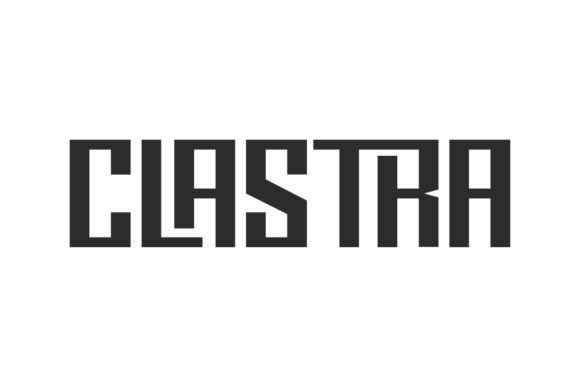
To appreciate Clastra, you first need to understand its aesthetic DNA. As described in its core features, Clastra is a "cool and robotic styled font." But what does that actually mean in practice? Unlike traditional geometric fonts that rely on perfect circles and uniform spacing, Clastra often incorporates subtle irregularities, sharp angles, and structural elements that mimic the appearance of assembled parts or digital interfaces. It has an edge. It feels engineered rather than drawn.
This stylistic choice gives it immense versatility. While some display fonts are so niche they can only be used once per year, Clastra is built to match an incredibly large set of projects. It strikes a balance between readability and personality. You can use it for headlines that need to grab attention instantly, but its underlying structure remains clean enough to maintain professionalism. It adds character without sacrificing clarity, which is the holy grail of effective typography.
The Power of PUA Encoding
One of the most significant technical advantages of Clastra is its encoding method. Standard fonts usually offer a fixed set of characters: A-Z, 0-9, and basic punctuation. However, Clastra is PUA encoded. For those unfamiliar with the term, PUA stands for Private Use Area. In simple terms, this means the font file contains hidden layers of glyphs that are not mapped to standard keyboard keys.
Why should you care? Because it unlocks a world of customization. With PUA encoding, you gain access to all the special glyphs and swashes included in the font family. These might include alternate letterforms, decorative connectors, tech-inspired icons, or stylized punctuation marks that enhance the robotic theme. You can access these extras with ease using dedicated font management tools or specific software shortcuts. This allows you to create unique typographic compositions that cannot be replicated by users relying solely on standard text input. It turns a simple headline into a custom-designed graphic element.
Where Can You Use Clastra?
The beauty of Clastra lies in its adaptability. Because it is robotic yet stylish, it fits seamlessly into various contexts where technology, innovation, or modernity are central themes. Here are several practical ways to integrate it into your workflow:
- Tech Startups and SaaS Products: If you are building a brand for a software company, app, or hardware device, Clastra reinforces your message of cutting-edge innovation. Use it for your logo, website headers, or product packaging to signal that your business is forward-thinking.
- Gaming and Esports: The gaming community loves aggressive, high-energy visuals. Clastra’s sharp, mechanical aesthetic makes it ideal for tournament banners, stream overlays, and game UI elements. It conveys speed, precision, and competition.
- Music and Entertainment: For electronic music producers, DJ branding, or concert posters, Clastra provides the perfect backdrop. It pairs well with neon colors and dark backgrounds, creating a vibe that is both sleek and intense.
- Educational Content on STEM: Educators and bloggers covering science, technology, engineering, and math can use Clastra to make their materials feel more engaging. It helps break the monotony of standard academic text and captures the interest of students who are visually stimulated by modern designs.
- Freelance Portfolios: If you are a freelancer in the creative industry, using Clastra in your portfolio headers demonstrates your eye for detail and your ability to select appropriate tools for different jobs. It shows clients that you understand typography beyond the basics.
Practical Tips for Getting Started
Adding Clastra to your creative ideas is straightforward, but there are a few considerations to ensure you get the best results. First, remember that this is a display font. It is designed to be seen, not read in long paragraphs. Using it for body text can cause eye strain and reduce accessibility. Instead, pair it with a clean, neutral sans-serif or serif font for your longer content. Let Clastra handle the headlines, quotes, and key emphasis points.
Second, take advantage of the PUA features gradually. When you first install the font, you might feel overwhelmed by the number of alternate glyphs. Start by using the standard characters to establish your layout. Once you are comfortable, experiment with the swashes and special symbols. Try replacing a standard ampersand (&) or a period with one of the unique glyphs Clastra offers. Small changes can have a big impact on the overall aesthetic.
Third, consider color and context. Robotic fonts often look best against contrasting backgrounds. Dark mode interfaces with bright accent colors (like cyan, magenta, or electric blue) tend to highlight Clastra’s features effectively. Conversely, a monochromatic black-and-white design can also work beautifully if you focus on the structural details of the letters themselves.
Who Is This For?
You do not need to be a professional designer to use Clastra effectively. Thanks to user-friendly installation processes and intuitive glyph access, beginners can achieve professional-looking results. Entrepreneurs setting up their first Shopify store can use it for sale banners. Bloggers can use it for featured post titles. Even hobbyists creating custom stickers or t-shirt designs will find that Clastra adds a layer of polish that elevates their craft.
The font appeals to anyone who wants their work to stand out in a crowded digital landscape. In a world where everyone uses the same default fonts, choosing Clastra is a deliberate statement. It says that you pay attention to detail, that you value uniqueness, and that you are not afraid to experiment with style. It is a tool for creativity that respects the boundaries of good design while pushing the envelope of visual expression.
Final Thoughts on Design Impact
Typography is the voice of your design. Just as a person’s tone of voice can change depending on the situation, your font choice sets the emotional stage for your audience. Clastra brings a confident, futuristic, and slightly edgy tone to any project. It is robust enough for commercial use yet playful enough for personal creative endeavors.
As you explore your next project, take a moment to step back from the usual suspects. Add Clastra to your creative ideas and notice how it makes them stand out. Whether you are designing a logo, a social media campaign, or a presentation deck, this font has the potential to transform flat text into a dynamic visual experience. By leveraging its robotic charm and extensive glyph library, you are not just choosing a font; you are choosing a style that resonates with the modern world.